Cricut EasyPress Mini - Troubleshooting and Diagnostics Guide
Cricut EasyPress Mini - Troubleshooting and Diagnostics Guide
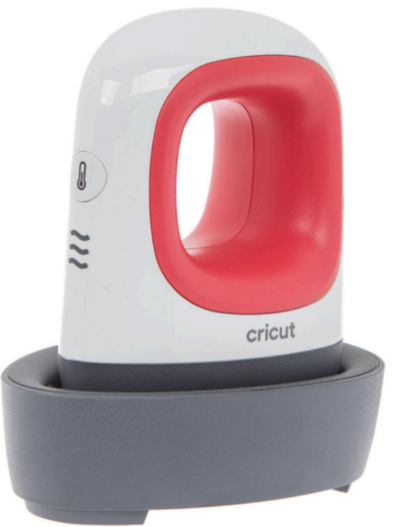
The Cricut EasyPress Mini is a compact heat press for transferring heat transfer vinyl (HTV) onto small projects. Perfect for iron-on applications on hats, shoes, pockets, and details. Unlike the larger EasyPress 2 and 3 models, the Mini has no LCD display or error codes - it communicates through beeps and lights. In this article, we'll cover the most common problems and how to solve them.
Cricut EasyPress Mini Specifications
Technical parameters:
- 🔥 3 temperature settings: Low, Medium, High (no precision control)
- ⏱️ No built-in timer - you must time manually
- 📏 Heat plate size: 3" x 1.5" (7.6 cm x 3.8 cm)
- 🎯 Use cases: Small HTV projects, lettering, embellishments, hats, shoes
- 🔌 Power: 230V (Europe) / 120V (USA)
- ⚡ Wattage: ~70W
Most Common EasyPress Mini Problems
1. Device Won't Turn On / No Beep
Symptoms:
- No sound after plugging in
- No light
- Device completely dead
Causes and solutions:
-
Check power supply:
- Ensure plug is properly inserted
- Test another outlet
- Check home circuit breakers
-
Check cable:
- Look for visible damage, kinks, cuts
- Check if cable is pinched
-
Reset device:
- Unplug for 10-15 minutes
- Let device "rest"
- Plug back in
- If problem persists, try longer reset (30 minutes)
When repair needed: If still no response after all steps - internal electronics problem.
2. Device Beeps But Won't Heat
Symptoms:
- You hear beep on power-up
- Light is on
- Plate stays cold
Diagnostics:
- Turn on device and select temperature
- Wait 3-5 minutes
- CAREFULLY touch plate with finger (quickly!)
- If cold - damaged heating element
Solutions:
- Check you selected temperature setting (side button)
- Wait long enough - Mini needs 2-3 minutes to heat
- Try all 3 temperature settings
When repair needed: If plate doesn't heat on any setting - heating element replacement required.
3. Insufficient Temperature / HTV Won't Transfer
Symptoms:
- HTV foil doesn't adhere completely
- Design lifts after removing carrier
- Uneven transfer
Solutions:
A. Check temperature setting:
- Low ~140°C (284°F) - for delicate materials, some foils
- Medium ~170°C (338°F) - for most standard HTV
- High ~190°C (374°F) - for difficult materials, thicker foils
B. Increase press time:
- Mini has no timer - use phone stopwatch
- Typical time: 15-30 seconds for small projects
- Some HTV requires up to 45 seconds
C. Increase pressure:
- Mini is lightweight - must press down with hand
- Use full hand strength, not just fingers
- Ensure even pressure across surface
D. Check HTV type:
- Different HTV brands have different temperature requirements
- Check foil manufacturer instructions
- Siser, Cricut, Oracle have different parameters
E. Clean plate:
- Old foil residue can block heat
- Clean plate when warm (not hot!)
- Use soft cloth
4. Continuous Beeping / Strange Sounds
Symptoms:
- Device beeps non-stop
- Unusual sounds
- Repeating signals
Possible causes:
- Thermostat problem - device can't maintain temperature
- Overheating - thermostat activating and deactivating
- Electronics damage - control circuit problem
Solutions:
- Unplug immediately
- Let device cool completely (30 minutes)
- Check ventilation - openings must not be blocked
- Don't use on soft surface (bed, couch)
When repair needed: If problem repeats - thermostat or control circuit diagnosis required.
5. Light On But No Beep
Symptoms:
- Light turns on
- No beep sound
- Unsure if device is working
Solution:
- This may be normal!
- Some units have quieter buzzer
- Check if plate heats - if yes, device works properly
- Cosmetic issue, no repair needed
6. Error Signal - Continuous Beeping and Flashing
Symptoms:
- Device emits continuous beeping sound
- Light constantly flashes red
- Device doesn't heat or work properly
- Immediately signals error after power-on
What it means: Continuous beeping and flashing is a critical error signal. The device has detected an internal problem and locked itself in protective mode. Most common causes:
- Damaged temperature sensor
- Heating element failure
- Control electronics malfunction
- System short circuit
Example of error signal:
Solution: ⚠️ This device requires professional repair. Don't attempt to fix it yourself - it may be dangerous and cause further damage.
What to do:
- Unplug the device from power immediately
- Don't use the device in this state
- Contact a professional repair service
- Describe symptoms precisely (continuous beeping, flashing)
Repair may involve replacing sensors, main board, or heating element. Don't risk continued use - the device may be completely damaged or create a safety hazard.
Material-Specific Problems
Hats / Caps
Problem: Hard to press on curved surfaces
Solutions:
- Use padding inside hat (towel, pillow)
- Press with small circular motions
- Divide project into smaller sections
- Time: 25-30 seconds, Temperature: High
Shoes
Problem: Irregular surface, HTV lifts
Solutions:
- Ensure shoe material is cotton/canvas
- Clean surface thoroughly (rubbing alcohol)
- Use silicone mat as base
- Strong pressure for 30-45 seconds
Pockets
Problem: Hard to reach small areas
Solutions:
- Insert cardboard or wooden block into pocket
- Turn garment inside out if possible
- Use parchment paper as protection
Preventive Maintenance
To avoid problems with Cricut EasyPress Mini:
✅ Regular cleaning:
- Clean plate after each use (warm, not hot!)
- Use soft cloth
- DO NOT use sharp objects or abrasive cleaners
✅ Storage:
- Always unplug after use
- Store in dry, cool place
- Don't wrap cable too tightly around device
- Don't place anything on press during storage
✅ During use:
- Use on stable, hard, flat surface
- DO NOT use on bed, couch, carpet
- Ensure good ventilation around device
- Don't cover ventilation openings
✅ Safety:
- DO NOT leave unattended when on
- Keep away from children
- Don't touch hot plate
- Always use silicone mat or parchment paper
When to Contact Service?
Contact professional service if:
❌ Device won't turn on despite testing different outlets
❌ Plate won't heat on any temperature setting
❌ Continuous beeping despite cooling and reset
❌ Visible mechanical damage (cracks, bending)
❌ Device emits strange smells or smoke
❌ Sparking or other dangerous symptoms
❌ Uneven heating despite cleaning
Cricut EasyPress Mini Repair at Cricut Doctor EU
If your Cricut EasyPress Mini needs professional repair, we're here to help!
Our offer:
- 🔍 Diagnostics: €15 (FREE with repair!)
- 🔧 Repair: From €25-40
- ✅ Warranty: 30 days on all repairs
- 🚚 Shipping: We serve all of Europe
Typical repairs:
- Heating element replacement
- Thermostat repair
- Temperature switch replacement
- Power cord repair/replacement
- Buzzer/LED replacement
📋 View complete repair pricing →
Summary
The Cricut EasyPress Mini is a reliable tool for small HTV projects, but like any device, it may occasionally need intervention. Most problems can be solved using the simple methods described in this article. For more serious malfunctions, professional service is recommended.
Remember:
- Mini has NO LCD display or error codes (unlike EasyPress 2/3)
- Communicates only through beeps and lights
- You must time manually - use a stopwatch!
- 3 temperature settings without precision control
- Perfect for small projects - doesn't replace larger presses
Regular maintenance and proper use significantly extend device lifespan!
Having problems with Cricut EasyPress Mini? Contact us - we're happy to help!